GenAsset
Dashboard docs
Documentation

GenAsset dashboard docs

A simple guide to get from token creation to saved versions in the dashboard, with practical ComfyUI and API examples.

1. Quickstart

For a fresh workspace, this is the fastest path.

  1. Sign in with Google.
  2. Create one workspace token in Onboarding.
  3. Download hello-genasset.json.
  4. Install GenAsset custom nodes in ComfyUI Manager.
  5. Run the workflow and confirm your asset appears in the dashboard.

2. Install in ComfyUI

Use Manager first. Keep git install as fallback.

In ComfyUI, open Manager, search for GenAsset, install the custom nodes, then restart ComfyUI.

cd ComfyUI/custom_nodes && git clone https://github.com/steliosot/ComfyUI-GenAsset.git

3. Run your first example

Use one tiny save flow to prove the full round trip.

Open hello-genasset.json in ComfyUI and set:

  • base_url = your GenAsset URL
  • workspace_token = your workspace token

Queue the workflow. Then in the dashboard check Assets for the new item and version ID.

4. Dashboard guide

What each area is for once data starts flowing.

Onboarding

Create tokens, download workflow templates, and verify setup status.

Generations

Chronological feed of incoming saves from ComfyUI or API clients.

Assets

Stable creative objects with version history and metadata.

Asset detail

Compare versions, view prompt/model/seed/workflow, and copy IDs.

Import

Bring existing images and workflow JSON into a new or existing asset.

Settings

Workspace sharing, token hygiene, and account-level controls.

5. Examples

Two simple patterns most teams start with.

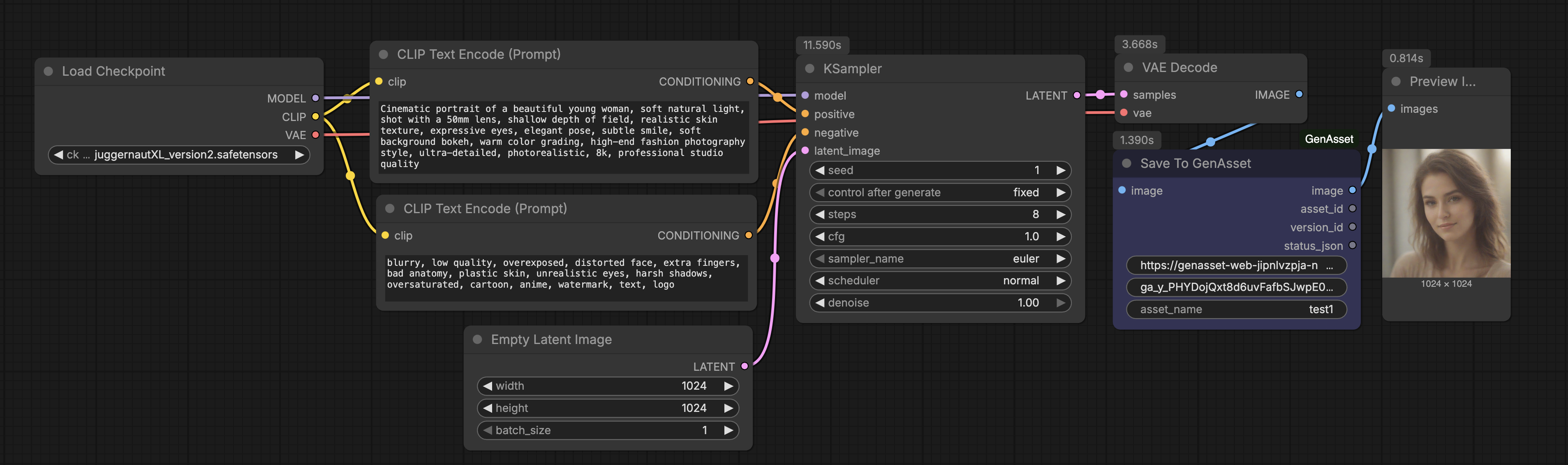
Text to image
  • Create with CLIP + KSampler + VAE Decode.
  • Send output image to Save To GenAsset.
  • Use stable asset_name for clean version history.
Image to image
  • Start from an existing image or latent input.
  • Adjust denoise, prompt, or sampler settings.
  • Save again to the same asset_name to create v2, v3, v4...

6. API

Minimal requests you can script in Python or curl.

Get workspace
curl -H "Authorization: Bearer ga_your_workspace_token" \
  https://genasset-web-jipnlvzpja-nw.a.run.app/api/v1/workspace
Save generation
curl -X POST \
  -H "Authorization: Bearer ga_your_workspace_token" \
  -H "Content-Type: application/json" \
  -d '{
    "asset_name":"portrait-run-01",
    "preview_image_base64":"<base64_png>",
    "metadata":{"prompt":"55mm portrait", "seed":530117223, "model":"Juggernaut XL"}
  }' \
  https://genasset-web-jipnlvzpja-nw.a.run.app/api/v1/generations
List assets
curl -H "Authorization: Bearer ga_your_workspace_token" \
  "https://genasset-web-jipnlvzpja-nw.a.run.app/api/v1/assets?limit=20"
Ready to run it?

Create a token, run one workflow, and check your first version in Assets.